topi SaaS Events API (1.1.0)
Download OpenAPI specification:
topi SaaS puts a contractual entity's own contract decision inside topi's offer flow. Three parties touch a single offer:
| Who | Does what |
|---|---|
| Seller | Builds the offer for their business customer, in the topi Tool or through the seller API. |
| End customer | Reviews and accepts the offer in the topi hosted checkout. |
| You, the contractual entity | Decide whether to take the accepted offer, and tell topi SaaS the outcome. |
Offers themselves are created and read through the seller API or topi Tool, documented at developer.topi.eu. This page covers only what is specific to the SaaS integration.
The offer passes through three moments. Only two of them carry events.
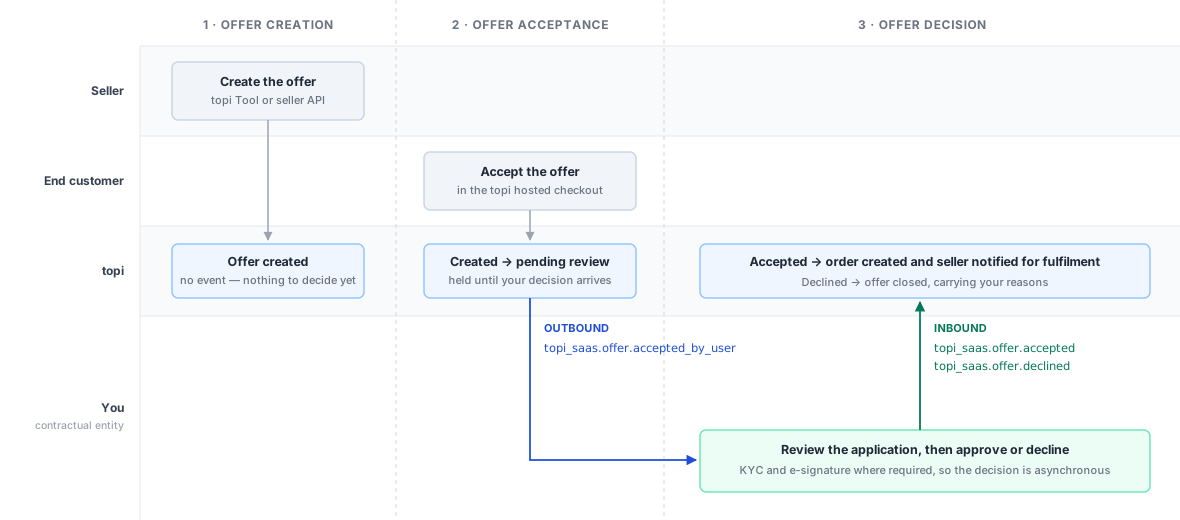
| Direction | Event | Sent when | Signed with |
|---|---|---|---|
| Outbound | topi_saas.offer.accepted_by_user |
The end customer accepted the offer, which now waits for your review | Svix, svix-* headers |
| Inbound | topi_saas.offer.accepted |
You take the offer; topi creates the order and notifies the seller for order fulfilment | X-Entity-Signature: v1=<hex> |
| Inbound | topi_saas.offer.declined |
You turn the offer down; declined_reasons is required |
X-Entity-Signature: v1=<hex> |
The two directions are independent requests, not a request and its response: acknowledge the
outbound delivery with 2xx as soon as you have stored it, then post your decision separately
once you have made it.
Prerequisites
| What | How you get it |
|---|---|
| Seller credentials | A seller account and an OAuth client, needed only to create test offers. Part of seller API setup rather than this integration, see developer.topi.eu. |
| Outbound endpoint | An HTTPS URL you host that receives the events below. Once topi registers it, you are given the signing secret for that endpoint. |
| Inbound secret | You generate an HMAC secret and share it with topi over a one-time secure link. topi gives it an id and stores it against your entity. |
| Entity key | The entity in the inbound path, assigned by topi. It must match the contractual entity of the offer you act on. |
Environments
| Environment | Inbound webhook host |
|---|---|
| Sandbox | https://topi-saas.topi-sandbox.eu |
| Production | https://topi-saas.topi.eu |
Integrate against Sandbox first. Both environments use the same paths and the same signing.
The two directions use different schemes. Reusing your outbound-verification code for the inbound direction produces signatures that never match.
Outbound (topi → you)
Uses Svix.
Deliveries carry svix-id, svix-timestamp and svix-signature, and your secret has the
form whsec_<base64>. Strip the whsec_ prefix and base64-decode the remainder to get the
key; the signed content is {svix-id}.{svix-timestamp}.{raw body}. Use a Svix library where
you can. During a secret rotation, both signatures are sent space-delimited in one header and
a match on either is valid.
Inbound (you → topi)
Uses X-Entity-Signature: v1=<hex>: HMAC-SHA256 over the raw
request body alone, with the secret used as opaque UTF-8 bytes rather than decoded. The
signed content has no timestamp and there is no replay window, so event_id idempotency is
what protects against replays.
Sign the exact bytes you transmit. Re-serialising or reformatting the JSON after signing invalidates the signature.
The entity in the path is your contractual entity key, assigned by topi. It must match the contractual entity of the offer you are acting on: a valid signature for one entity cannot act on another entity's offers.
A well-formed, correctly signed request is acknowledged with 202 Accepted and processed asynchronously — 202 means received, not applied. A bad signature or an unknown entity returns 401. Bodies must not exceed 2 MiB.
Send a distinct event_id per event and reuse it on retries; topi deduplicates on it.
Outbound events are delivered through Svix, so the rules here are Svix's. The Svix retry documentation is authoritative.
A delivery succeeds when your endpoint returns a 2xx within 15 seconds. Anything else,
including a 3xx, is a failure and is retried: immediately, then after 5 seconds, 5
minutes, 30 minutes, 2 hours, 5 hours, 10 hours, and 10 hours again. Retries repeat the
same event_id, so deduplicate on it.
| Situation | Answer with |
|---|---|
| You have stored the event | 2xx, empty body |
| You are temporarily broken | 5xx, or let the request time out |
| The payload is one you will never accept | 4xx, a body naming the problem, and the header webhook-delivery: abort-message |
Do not answer 2xx with an error in the body: topi records the delivery as successful and
does not read the body, so the failure is invisible to both sides. A 4xx on its own does
not stop the retries, only webhook-delivery: abort-message does. That header also accepts
disable, which switches your endpoint off entirely, so do not send it.
Verifying the signature and validating the body are fast enough to do before you answer. Anything that touches your own systems belongs after it.
You can test your webhook integration in the Sandbox environment before going live. There are two ways to simulate customer acceptance and exercise the whole flow:
- Via topi Tool — complete offer creation and customer acceptance in a browser, the way a seller and customer actually do it.
- Via Seller API — drive the same lifecycle headlessly through sandbox endpoints, with no browser involved.
Both end at the same place: the outbound event reaches your endpoint and you post your decision back.
Before you start, contact topi to have a test seller account and catalog set up for you. Both routes need them.
Via topi Tool
Test in the Sandbox environment before going live. This is the full browser flow, the same one sellers and customers go through in production.
Act as the telesales agent
- Log in to the topi Tool at seller.topi-sandbox.eu with your sandbox seller account.
- Create an offer for your test customer: the confirmation dialog then shows the checkout link to share with them.
Act as the end customer
- Open the topi hosted checkout: open the link the topi Tool provided when the offer was created.
- Complete the checkout: proceed through customer enrolment, and identity verification where it is required, then review the contract terms and accept.
You, the contractual entity
- Receive the outbound webhook:
topi_saas.offer.accepted_by_userarrives at your endpoint. - Acknowledge delivery: verify the signature and return
2xx. - Submit your decision: send back
topi_saas.offer.acceptedortopi_saas.offer.declined.
Via Seller API
Test in the Sandbox environment before going live. Testing headlessly via the Seller API allows full automation without browser interaction.
0. Get a token
API reference: Authentication · Sandbox
| Environment | Seller API | Token endpoint |
|---|---|---|
| Sandbox | https://seller-api-sandbox.topi-sandbox.eu |
https://identity.topi-sandbox.eu/oauth2/token |
| Production | https://seller-api.topi.eu |
https://identity.topi.eu/oauth2/token |
Request a token with the client-credentials grant, sending your client id and secret as HTTP Basic auth:
export SELLER_API=https://seller-api-sandbox.topi-sandbox.eu

curl -X POST https://identity.topi-sandbox.eu/oauth2/token \
  -u "$CLIENT_ID:$CLIENT_SECRET" \
  -d grant_type=client_credentials \
  -d scope=client
{ "access_token": "eyJhbGciOi...", "expires_in": 7200, "token_type": "bearer", "scope": "..." }
Tokens last two hours and are sent as Authorization: Bearer <token>. Every example below
assumes TOKEN holds the access_token:
TOKEN=$(curl -s -X POST https://identity.topi-sandbox.eu/oauth2/token \
  -u "$CLIENT_ID:$CLIENT_SECRET" \
  -d grant_type=client_credentials -d scope=client | jq -r .access_token)
1. Find the product in the catalog
API reference: GET /v1/catalog/products
Every seller_product_reference you put on an offer line must already exist in the topi
catalog, so search before importing — the product may be there already.
curl -s "$SELLER_API/v1/catalog/products?term=MacBook" \
  -H "Authorization: Bearer $TOKEN" \
  | jq '.[] | {title, reference, pricing_category, available_contract_terms}'
{
  "title": "Apple MacBook Pro 14\"",
  "reference": "MBP14-M4",
  "pricing_category": "macbook_pro_13_14",
  "available_contract_terms": { "can_pay_now": true, "can_rent": true, "rent": { "duration": 36 } }
}
term is required and must be at least three characters; anything shorter fails with
422 searched term length should be at least 3 characters.
The response is a flat array. Each entry's seller_product_references is what you quote on
an offer line, and available_contract_terms tells you whether the product can be rented,
bought outright, or both.
If your product is already listed, skip to step 3. If it is not, import it first.
2. Import the product
API reference: POST /v1/catalog/import · Syncing your catalog
Creating an offer for a reference topi does not know fails with 422 NotFoundProducts, so
import the product before you need it.
curl -X POST "$SELLER_API/v1/catalog/import" \
  -H "Authorization: Bearer $TOKEN" -H "Content-Type: application/json" \
  -d '{
    "products": [{
      "title": "Apple MacBook Pro 14\"",
      "is_active": true,
      "seller_product_type": "hardware",
      "manufacturer": "Apple",
      "price": { "net": 199900, "gross": 199900, "currency": "USD" },
      "seller_product_references": [{ "source": "SKU", "reference": "MBP14-M4" }]
    }]
  }'
The response is an import summary; check that total_products_rejected is zero.
All money is in minor units — 199900 means $1,999.00. This holds everywhere in the
seller API and in the events below.
3. Create the offer
API reference: POST /v1/offers · Creating an offer
OFFER=$(curl -s -X POST "$SELLER_API/v1/offers" \
  -H "Authorization: Bearer $TOKEN" -H "Content-Type: application/json" \
  -d '{
    "seller_offer_reference": "ORDER-1001",
    "sales_channel": "ecommerce",
    "expires_at": "2026-09-01T12:00:00Z",
    "success_redirect": "https://seller.example/checkout/success",
    "exit_redirect": "https://seller.example/checkout/cancel",
    "customer": {
      "email": "buyer@example.com",
      "full_name": "Ada Lovelace",
      "company": {
        "name": "Example Inc.",
        "billing_address": {
          "line1": "285 Fulton Street", "city": "New York",
          "postal_code": "10007", "region": "US-NY", "country_code": "US"
        }
      }
    },
    "shipping_address": {
      "recipient_name": "Ada Lovelace",
      "line1": "285 Fulton Street", "city": "New York",
      "postal_code": "10007", "region": "US-NY", "country_code": "US"
    },
    "lines": [{
      "title": "Apple MacBook Pro 14\"",
      "quantity": 1,
      "price": { "net": 199900, "currency": "USD" },
      "seller_product_reference": { "source": "SKU", "reference": "MBP14-M4" },
      "selected_contract_type": "rent"
    }]
  }')

OFFER_ID=$(echo "$OFFER" | jq -r .id)
echo "$OFFER" | jq -r .checkout_redirect_url
A 201 returns the offer, including status: created and the checkout_redirect_url your
customer opens to complete checkout.
success_redirect and exit_redirect are required when sales_channel is ecommerce,
even though the schema marks them optional. Omitting exit_redirect fails with
422 the field exit_redirect has to be provided.
Other 422 responses: UnsupportedProducts, UnsupportedShipping, CurrenciesMismatch,
and ExistingOfferReference when that seller_offer_reference is already on a live offer.
Send shipping only if you have registered a shipping method with
shippingMethod#create;
an unknown seller_shipping_reference fails with UnsupportedShipping.
4. The end customer accepts
API reference: Simulating scenarios
In production this is a browser flow: the customer opens checkout_redirect_url and
completes checkout, where enrolment collects the company details and verifies identity.
In sandbox you can do the same thing over the API:
curl -X POST "$SELLER_API/v1/scenario_simulations/mark_offer_accepted" \
  -H "Authorization: Bearer $TOKEN" -H "Content-Type: application/json" \
  -d '{"scenario_input": {"id": "'"$OFFER_ID"'"}}'
This creates the user and the end customer, applies the offer's pre-selected contract terms, and accepts on the customer's behalf.
Despite its name, mark_offer_accepted does not leave the offer in accepted.
Accepting is your decision, not topi's, so the offer moves to pending_review instead —
which is exactly what the next two steps are about.
Whichever route you take, the offer is now in pending_review and topi has sent
offer.accepted_by_user to your endpoint.
To run the loop again on the same offer, use mark_offer_for_review, which returns it to
pending_review and re-sends the event. It needs an offer that already has an end customer,
so it repeats the loop rather than starting it.
5. You receive the accepted_by_user event
API reference: Outbound Events, below
This is the only event topi sends you. It carries the offer and its lines, the end customer, and the user who accepted.
You receive it only for offers whose contractual entity is the one assigned to you. An offer created under a different entity runs the same journey and sends you nothing.
Verify the signature (see Signing), respond 2xx promptly, and make your decision
asynchronously — do not hold the request open while you decide.
Keep the delivery. You send its payload back in step 6, unchanged apart from your own
fields.
Note — reading a line's contract terms.
Each offer line names the contract the customer took in selected_contract_type,
while available_contract_terms holds a branch per contract type the line supports. Read only the branch
that matches the selection; the others describe options that were not taken.
selected_contract_type |
Read from | Fields |
|---|---|---|
rent |
available_contract_terms.rent |
duration, monthly_amount |
pay_now |
available_contract_terms.pay_now |
amount |
A single offer can mix both: one line rented, another paid for outright. Decide per line, not per offer.
6. You reply: accepted or declined
API reference: Inbound Events, below
Send back the payload you received, unchanged, with external_id and external_status
added to offer. topi validates it against its own record of the offer, so a partial or
edited payload is not the same thing.
export WEBHOOK_HOST=https://topi-saas.topi-sandbox.eu
export ENTITY=...           # your contractual entity key, assigned by topi
export INBOUND_SECRET=...   # the secret you generated and shared with topi

# event.json is the offer.accepted_by_user delivery you received in step 5.
BODY=$(jq -c \
  --arg event_id "$(uuidgen | tr 'A-Z' 'a-z')" \
  --arg created_at "$(date -u +%Y-%m-%dT%H:%M:%SZ)" \
  '{ type: "topi_saas.offer.accepted",
     version: 1,
     event_id: $event_id,
     created_at: $created_at,
     object_id: .object_id,
     payload: (.payload | .offer += { external_id: "ENTITY-APP-4471",
                                      external_status: "APPROVED" }) }' event.json)

SIG=$(printf '%s' "$BODY" | openssl dgst -sha256 -hmac "$INBOUND_SECRET" | sed 's/^.* //')

curl -X POST "$WEBHOOK_HOST/topi-saas/$ENTITY/events" \
  -H "Content-Type: application/json" \
  -H "X-Entity-Signature: v1=$SIG" \
  --data-binary "$BODY"
Accepting moves the offer to accepted and creates an order. To decline instead, send
topi_saas.offer.declined and add a declined_reasons - non-empty list of strings - to payload.offer, where it is required.
external_id and external_status are your own identifiers for the application, and both
events require them.
Every event shares a common envelope, and payload varies by type. event_id is your
idempotency key. The schemas below are the contract: this site is republished only when a
contract version reaches production, so what you read here is what is running.
Offer Accepted by User Webhook
Fired when an end-user accepts an offer inside the topi SaaS journey. Use this event to initiate your downstream contract creation process.
Delivered via Svix; verify the delivery using the svix-id, svix-timestamp and
svix-signature headers and the endpoint secret provisioned for your endpoint.
Authorizations:
Request Body schema: application/jsonrequired
| type required | string Value: "topi_saas.offer.accepted_by_user" Event type in the format |
| version required | integer Schema version of this event type. Incremented only on breaking changes. Additive (non-breaking) changes do not increment the version. |
| event_id required | string <uuid> Unique ID of this event instance. Consumers should use this as an
idempotency key — if the same |
| created_at required | string <date-time> ISO 8601 timestamp of when the event was created. |
| object_id required | string <uuid> ID of the primary object this event relates to. For offer events this is the offer ID. |
required | object Event-specific payload; the concrete schema depends on |
Responses
Request samples
- Payload
{- "type": "topi_saas.offer.accepted_by_user",
- "version": 1,
- "event_id": "a1b2c3d4-e5f6-7890-abcd-ef1234567890",
- "created_at": "2026-05-19T10:30:00Z",
- "object_id": "e5f6a7b8-c9d0-1234-efab-345678901234",
- "payload": {
- "seller": {
- "id": "f6a7b8c9-d0e1-2345-fabc-456789012345",
- "seller_name": "Acme Tech GmbH",
- "external_id": "ENTITY_VENDOR_001"
}, - "offer": {
- "id": "e5f6a7b8-c9d0-1234-efab-345678901234",
- "seller_offer_reference": "ORDER-2026-1234",
- "lines": [
- {
- "id": "a7b8c9d0-e1f2-3456-abcd-567890123456",
- "title": "Apple MacBook Pro 16\" M3 Pro",
- "quantity": 2,
- "price": {
- "currency": "EUR",
- "gross": 249900,
- "net": 249900,
- "tax_rate": 0
}, - "product_category": "laptops",
- "available_contract_terms": {
- "pay_now": {
- "amount": {
- "currency": "EUR",
- "gross": 25200,
- "net": 25200,
- "tax_rate": 0
}
}, - "rent": {
- "duration": 24,
- "monthly_amount": {
- "currency": "EUR",
- "gross": 21000,
- "net": 21000,
- "tax_rate": 0
}
}
}, - "selected_contract_type": "rent"
}
], - "total_price": {
- "currency": "EUR",
- "gross": 499800,
- "net": 499800,
- "tax_rate": 0
}, - "sales_agent": {
- "name": "Erika Beispiel",
- "email": "erika.beispiel@acme-tech.de",
- "external_agent_id": "ENTITY_AGENT_007"
}, - "shipping_address": {
- "recipient_name": "Widgets & Co. GmbH",
- "line_1": "Lagerstraße 7",
- "line_2": "Gebäude B",
- "city": "Hamburg",
- "postal_code": "20097",
- "country_code": "DE",
- "region": ""
}
}, - "end_customer": {
- "id": "b8c9d0e1-f2a3-4567-bcde-678901234567",
- "external_id": "ENTITY_CUST_9876",
- "company_name": "Widgets & Co. GmbH",
- "company_type": "GmbH",
- "registration_number": "HRB 123456",
- "vat_number": "DE123456789",
- "tax_number": "12345678",
- "returning_customer": false,
- "billing_address": {
- "line_1": "Musterstraße 42",
- "line_2": "3. OG",
- "city": "Hamburg",
- "postal_code": "20095",
- "country_code": "DE",
- "region": ""
}, - "address": {
- "line_1": "Musterstraße 42",
- "line_2": "3. OG",
- "city": "Hamburg",
- "postal_code": "20095",
- "country_code": "DE",
- "region": ""
}
}, - "user": {
- "id": "c9d0e1f2-a3b4-5678-cdef-789012345678",
- "external_id": "ENTITY_USER_5432",
- "email": "max.muster@widgets-co.de",
- "first_name": "Max",
- "last_name": "Muster",
- "phone_number": "+494012345678",
- "phone_type": "Mobile"
}
}
}Offer Accepted (Entity Confirmation) Webhook
Sent by the contractual entity to confirm that it has accepted the offer on its side, enriching it with its own external IDs.
Delivered to POST /topi-saas/{entity}/events, signed with X-Entity-Signature.
Authorizations:
Request Body schema: application/jsonrequired
| type required | string Value: "topi_saas.offer.accepted" Event type in the format |
| version required | integer Schema version of this event type. Incremented only on breaking changes. Additive (non-breaking) changes do not increment the version. |
| event_id required | string <uuid> Unique ID of this event instance. Consumers should use this as an
idempotency key — if the same |
| created_at required | string <date-time> ISO 8601 timestamp of when the event was created. |
| object_id required | string <uuid> ID of the primary object this event relates to. For offer events this is the offer ID. |
required | object Event-specific payload; the concrete schema depends on |
Responses
Request samples
- Payload
{- "type": "topi_saas.offer.accepted",
- "version": 1,
- "event_id": "b2c3d4e5-f6a7-8901-bcde-f12345678901",
- "created_at": "2026-05-19T11:00:00Z",
- "object_id": "e5f6a7b8-c9d0-1234-efab-345678901234",
- "payload": {
- "seller": {
- "id": "f6a7b8c9-d0e1-2345-fabc-456789012345",
- "seller_name": "Acme Tech GmbH",
- "external_id": "ENTITY_VENDOR_001"
}, - "offer": {
- "id": "e5f6a7b8-c9d0-1234-efab-345678901234",
- "external_status": "CONFIRMED",
- "external_id": "ENTITY_ORDER_4321",
- "seller_offer_reference": "ORDER-2026-1234",
- "lines": [
- {
- "id": "a7b8c9d0-e1f2-3456-abcd-567890123456",
- "title": "Apple MacBook Pro 16\" M3 Pro",
- "quantity": 2,
- "price": {
- "currency": "EUR",
- "gross": 249900,
- "net": 249900,
- "tax_rate": 0
}, - "product_category": "laptops",
- "available_contract_terms": {
- "pay_now": {
- "amount": {
- "currency": "EUR",
- "gross": 25200,
- "net": 25200,
- "tax_rate": 0
}
}, - "rent": {
- "duration": 24,
- "monthly_amount": {
- "currency": "EUR",
- "gross": 21000,
- "net": 21000,
- "tax_rate": 0
}
}
}, - "selected_contract_type": "rent"
}
], - "total_price": {
- "currency": "EUR",
- "gross": 499800,
- "net": 499800,
- "tax_rate": 0
}, - "sales_agent": {
- "name": "Erika Beispiel",
- "email": "erika.beispiel@acme-tech.de",
- "external_agent_id": "ENTITY_AGENT_007"
}, - "shipping_address": {
- "recipient_name": "Widgets & Co. GmbH",
- "line_1": "Lagerstraße 7",
- "line_2": "Gebäude B",
- "city": "Hamburg",
- "postal_code": "20097",
- "country_code": "DE",
- "region": ""
}
}, - "end_customer": {
- "id": "b8c9d0e1-f2a3-4567-bcde-678901234567",
- "external_id": "ENTITY_CUST_9876",
- "company_name": "Widgets & Co. GmbH",
- "returning_customer": false,
- "address": {
- "line_1": "Musterstraße 42",
- "line_2": "3. OG",
- "city": "Hamburg",
- "postal_code": "20095",
- "country_code": "DE",
- "region": ""
}, - "company_type": "GmbH",
- "registration_number": "HRB 123456",
- "vat_number": "DE123456789",
- "tax_number": "12345678",
- "billing_address": {
- "line_1": "Musterstraße 42",
- "line_2": "3. OG",
- "city": "Hamburg",
- "postal_code": "20095",
- "country_code": "DE",
- "region": ""
}
}, - "user": {
- "id": "c9d0e1f2-a3b4-5678-cdef-789012345678",
- "external_id": "ENTITY_USER_5432",
- "email": "max.muster@widgets-co.de",
- "first_name": "Max",
- "last_name": "Muster",
- "phone_number": "+494012345678",
- "phone_type": "Mobile"
}
}
}Offer Declined Webhook
Sent by the contractual entity to notify topi SaaS that an offer has been declined on its side.
Delivered to POST /topi-saas/{entity}/events, signed with X-Entity-Signature.
Authorizations:
Request Body schema: application/jsonrequired
| type required | string Value: "topi_saas.offer.declined" Event type in the format |
| version required | integer Schema version of this event type. Incremented only on breaking changes. Additive (non-breaking) changes do not increment the version. |
| event_id required | string <uuid> Unique ID of this event instance. Consumers should use this as an
idempotency key — if the same |
| created_at required | string <date-time> ISO 8601 timestamp of when the event was created. |
| object_id required | string <uuid> ID of the primary object this event relates to. For offer events this is the offer ID. |
required | object Event-specific payload; the concrete schema depends on |
Responses
Request samples
- Payload
{- "type": "topi_saas.offer.declined",
- "version": 1,
- "event_id": "c3d4e5f6-a7b8-9012-cdef-123456789012",
- "created_at": "2026-05-19T11:30:00Z",
- "object_id": "e5f6a7b8-c9d0-1234-efab-345678901234",
- "payload": {
- "seller": {
- "id": "f6a7b8c9-d0e1-2345-fabc-456789012345",
- "seller_name": "Acme Tech GmbH",
- "external_id": "ENTITY_VENDOR_001"
}, - "offer": {
- "id": "e5f6a7b8-c9d0-1234-efab-345678901234",
- "external_status": "DECLINED",
- "external_id": "ENTITY_ORDER_4321",
- "declined_reasons": [
- "credit_check_failed"
], - "seller_offer_reference": "ORDER-2026-1234",
- "lines": [
- {
- "id": "a7b8c9d0-e1f2-3456-abcd-567890123456",
- "title": "Apple MacBook Pro 16\" M3 Pro",
- "quantity": 2,
- "price": {
- "currency": "EUR",
- "gross": 249900,
- "net": 249900,
- "tax_rate": 0
}, - "product_category": "laptops",
- "available_contract_terms": {
- "pay_now": {
- "amount": {
- "currency": "EUR",
- "gross": 25200,
- "net": 25200,
- "tax_rate": 0
}
}, - "rent": {
- "duration": 24,
- "monthly_amount": {
- "currency": "EUR",
- "gross": 21000,
- "net": 21000,
- "tax_rate": 0
}
}
}, - "selected_contract_type": "rent"
}
], - "total_price": {
- "currency": "EUR",
- "gross": 499800,
- "net": 499800,
- "tax_rate": 0
}, - "sales_agent": {
- "name": "Erika Beispiel",
- "email": "erika.beispiel@acme-tech.de",
- "external_agent_id": "ENTITY_AGENT_007"
}, - "shipping_address": {
- "recipient_name": "Widgets & Co. GmbH",
- "line_1": "Lagerstraße 7",
- "line_2": "Gebäude B",
- "city": "Hamburg",
- "postal_code": "20097",
- "country_code": "DE",
- "region": ""
}
}, - "end_customer": {
- "id": "b8c9d0e1-f2a3-4567-bcde-678901234567",
- "external_id": "ENTITY_CUST_9876",
- "company_name": "Widgets & Co. GmbH",
- "company_type": "GmbH",
- "registration_number": "HRB 123456",
- "vat_number": "DE123456789",
- "tax_number": "12345678",
- "returning_customer": false,
- "billing_address": {
- "line_1": "Musterstraße 42",
- "line_2": "3. OG",
- "city": "Hamburg",
- "postal_code": "20095",
- "country_code": "DE",
- "region": ""
}, - "address": {
- "line_1": "Musterstraße 42",
- "line_2": "3. OG",
- "city": "Hamburg",
- "postal_code": "20095",
- "country_code": "DE",
- "region": ""
}
}, - "user": {
- "id": "c9d0e1f2-a3b4-5678-cdef-789012345678",
- "external_id": "ENTITY_USER_5432",
- "email": "max.muster@widgets-co.de",
- "first_name": "Max",
- "last_name": "Muster",
- "phone_number": "+494012345678",
- "phone_type": "Mobile"
}
}
}